A counter without tracking: one click, two requests
Starting point
I wanted to know how often the links to LinkedIn and GitHub are clicked. The slogan “no ads and no tracking” stays unchanged.
The redirect
The links to LinkedIn and GitHub point to two short paths on my own domain. The site’s web server answers there with a redirect (HTTP 302) to the target. The redirect is set in the web server’s configuration and is independent of the counting. If the counting fails, the redirect still happens.
The counting
Counting happens after the fact and not on the page. There is no counting script in the browser, no tracking pixel and no third party. A small script reads the web server’s request log and adds one row per click to a database on the server. Only GET requests to the two paths that were answered with the redirect (status 302) are counted; HEAD requests do not count. If the browser identifier contains “bot”, “spider” or “crawl” (case does not matter), the click counts as a “detected program”, everything else as “not detected as a program”. The script does not assign the “suspected program” class. Until the evening of 21 October 2026 (UTC) it was assigned by hand, see below.
A row consists of the time (UTC), the target, the classification and the three numbers about the surroundings of the click.
The bug: one click, two requests
The site loads Astro’s page transitions (ClientRouter). It intercepts clicks on links and first fetches the target itself with fetch(). With a redirect to a foreign domain, that fails, and after that the browser navigates normally. So the server saw two requests per click: the one from fetch() and the one from the normal navigation.
I noticed it during my own test clicks. For each click, the log held two lines with the same browser identifier. For LinkedIn, the two lines were at most one second apart; for GitHub, they were in the same second.
The proof in the browser
I reproduced why the fetch fails in the developer tools. In one tab, I removed the attribute data-astro-reload from one of the links and clicked it. That click counts as test data.
Safari’s network tab shows the sequence:
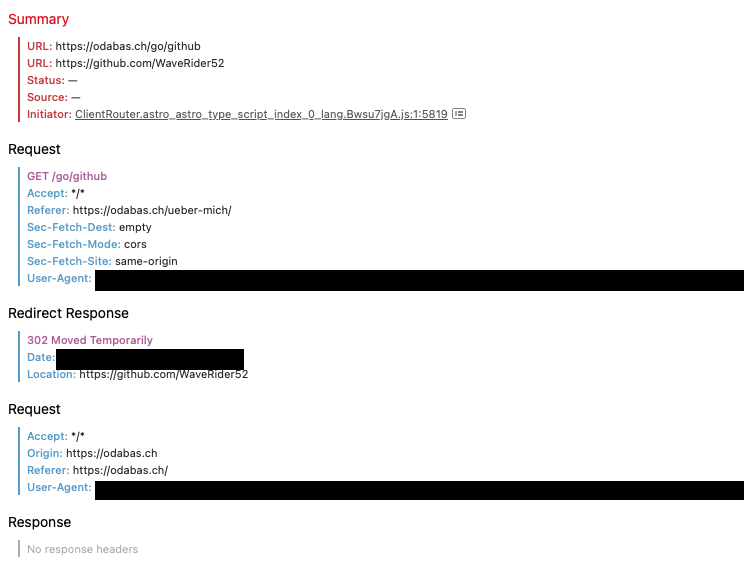
Network tab in Safari. Browser identifier and timestamp are hidden.
- The first request goes to
/go/github. Its initiator is theClientRouter, and its mode iscors. - My web server answers with the redirect (302) to the GitHub profile.
- The request to GitHub carries the header
Origin: https://odabas.ch. No response comes back; the entry is red and has no status. - Then the second request follows, the normal navigation to the GitHub page.
The console names the reason. I reproduced the same path from the console with a HEAD request, so that the counter does not count anything:
fetch('/go/github', { method: 'HEAD' }).catch(e => console.log('fetch failed:', e.message))Chrome reports:
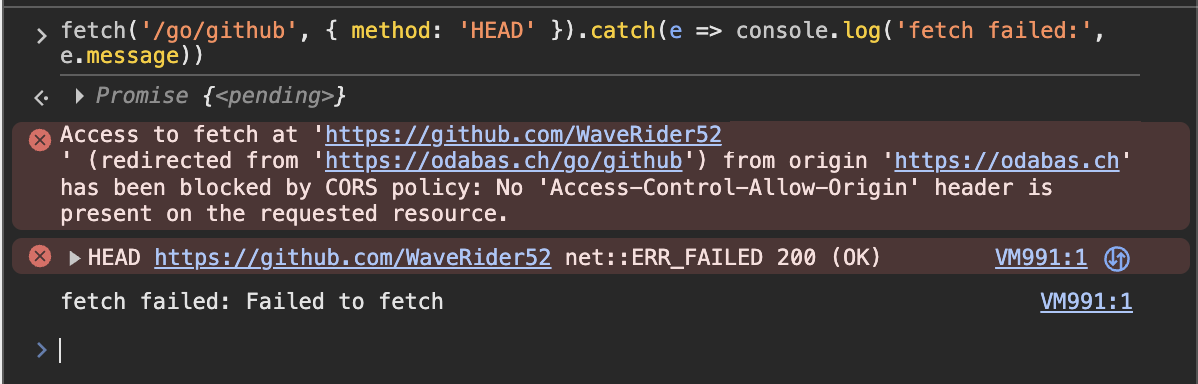
Console in Chrome. The source reference of the message is hidden.
Access to fetch at ‘https://github.com/WaveRider52’ (redirected from ‘https://odabas.ch/go/github’) from origin ‘https://odabas.ch’ has been blocked by CORS policy: No ‘Access-Control-Allow-Origin’ header is present on the requested resource.
Safari says the same in its own words: “Origin https://odabas.ch is not allowed by Access-Control-Allow-Origin.”
A look at the responses in the terminal confirms both sides (output shortened):
$ curl -sI https://odabas.ch/go/github
HTTP/1.1 302 Moved Temporarily
[…]
Location: https://github.com/WaveRider52

$ curl -sI -H 'Origin: https://odabas.ch' https://github.com/WaveRider52
HTTP/2 200
[…]

$ curl -sI -H 'Origin: https://odabas.ch' https://github.com/WaveRider52 | grep -i '^access-control-allow-origin'
# no output
My server redirects correctly and sets no cookie while doing so. The response from GitHub lacks the line access-control-allow-origin. Without it, the browser blocks the request to another domain. That is CORS, and the assumption has become an observation.
The fix
All links to the two paths now carry the attribute data-astro-reload. The page transitions then do not intervene. A check of the built site found no link to the two paths without the attribute.
After that, one click produced one request, measured in Safari. For other browsers this follows from the fix; I have not measured it there. The data from the time of the bug is test data and goes into no evaluation.
What is stored
For each click, the server stores the time (UTC), the target and a classification (“not detected as a program”, “detected program” or “suspected program”), plus three numbers for the 30 seconds around the click: how many different pages the same browser identifier requested, the highest number of page requests in a single second, and how many files (styles, scripts, fonts, images) it requested. The browser identifier itself is not in the database; it sits in memory only while the evaluation runs. The database contains no addresses and no identifiers of individual visitors. No cookies are used for the counting. The redirect sets no cookie, checked for both paths.
Individual clicks are kept for up to twelve months, after which only daily totals remain. Backup copies on the server are kept for up to 14 days longer. Only daily totals per target and classification are public. The figures begin on the evening of 19 October 2026 (UTC). Until the evening of 21 October 2026 (UTC), they are hourly counts without page information. For that period, the “suspected program” class was assigned by hand, based on anomalies in the log, not automatically.
Since 17 October 2026, the web server’s request log writes time, request, status, data size and browser identifier for each request, without addresses, without user names and without a referring page. It is deleted when the web server is recreated, at the latest with the next publication. The upstream router keeps no access log. Its technical log can contain the peer address when a connection is dropped; that is not part of the web server’s request log.
Limits
Requests are counted, not people. Two clicks by the same person count twice. With every publication, the log up to that moment is lost, and clicks since the script’s last run are missing. Clicks during short outages of the upstream router would not be recorded.
The bot filter is coarse. Anyone who presents as a browser is counted. The classification is an estimate, not a certainty. The figure “not detected as a program” can include programs that pass themselves off as a browser. The “suspected program” class, assigned by hand, is based on anomalies in the log and can also affect a person. An http:// request to one of the paths typed by hand is first answered with a permanent redirect to https. The script counts only the following request over https, so once. The hourly counts until the evening of 21 October 2026 (UTC) could count both requests.
The timestamps are server time (UTC). Swiss local time is ahead of server time, by two hours until the clock change on 25 October 2026 and by one hour after that. What the hosting provider records at the network level is not part of this statement.
Current click counts
The table shows how often the links to GitHub and LinkedIn were clicked, not how often the page was visited. The numbers come from a file the server rewrites every 15 minutes; they are read when the page loads.
A click counts as a “detected program” when the browser identification contains “bot”, “spider” or “crawl”. A “suspected program” has so far only been assigned by hand, for imported clicks from the time of the hourly counts. Everything else is called “not detected as a program”. That does not mean that every one of these clicks comes from a person.
| Target | not detected as a program | detected program | suspected program | Sum |
|---|---|---|---|---|
| GitHub | – | – | – | – |
| – | – | – | – | |
| Total | – | – | – | – |
Counted since (UTC): – File generated (UTC): –
In closing
The previous log format contained fields for addresses. For an unencrypted request over http://, the router passes the visitor’s address on as a header (measured on 16 October 2026). For https:// it passes the connection through unchanged, so there is no such header. Since 17 October 2026 the web server no longer writes an address to its log. I checked the statement against the system, found this difference, and limited the format to what the counter and troubleshooting need.